How-To: Working with Evaluations
The evals package reads solved PyPSA networks, computes energy-system statistics, and renders
interactive visualisations. This guide explains the architecture, shows you how to register new
views, and walks through the pypsa.statistics API that underpins every chart.
Architecture: Model–View–Component
The evaluation pipeline follows a pattern that maps cleanly onto three concepts:
| Role | Implementation | Responsibility |
|---|---|---|
| Model | pypsa.NetworkCollection |
Holds one solved pypsa.Network per planning year |
| View | evals.views.* |
Queries statistics and prepares data for a specific chart |
| Component | evals.plots.* |
Renders a Plotly figure from the prepared data |
NetworkCollection ──► view_balance_electricity()
                           │
                           ├─ collect_myopic_statistics("supply", …)
                           ├─ collect_myopic_statistics("withdrawal", …)
                           ├─ rename / aggregate via config.categories
                           └─ Exporter ──► ESMBarChart.plot()
                                                │
                                          HTML + JSON output
Model — pypsa.NetworkCollection
A NetworkCollection is a thin dictionary wrapper mapping planning year (int) to a
pypsa.Network. Use read_networks to load one from a result
directory:
from evals.fileio import read_networks

nc = read_networks("results/my_scenario")
# nc.networks == {2030: <Network>, 2050: <Network>}
read_networks also patches each network with
ESMStatistics so that n.statistics.<method>() is available
on every loaded network.
Views — evals.views
A view is a plain function with the signature:
def view_<name>(result_path: Path, nc: NetworkCollection, config: dict) -> None:
    ...
It collects one or more statistics, applies category renaming from the config, constructs an
Exporter, and calls exporter.export(). All 25 built-in views are
importable from evals.views:
from evals.views import view_balance_electricity, view_capacity_electricity_production
Components — evals.plots
Each view delegates rendering to one of four chart classes:
| Class | Best for |
|---|---|
ESMBarChart |
Single-location stacked bar (supply/demand, capacities) |
ESMGroupedBarChart |
Faceted bars — one subplot per bus_carrier (heat systems, fuel groups) |
ESMTimeSeriesChart |
Hourly stacked area / line charts |
SankeyChart |
Full system energy-flow diagram |
The chart class used by each view is declared in config.default.toml under the chart key and
can be overridden per view (see Configuration).
Configuration
Config layers
View parameters live in two TOML files that are deep-merged at runtime (last wins):
evals/config.default.toml   ← shipped defaults (do not edit)
        ↓
evals/config.override.toml  ← your local overrides (create this file)
Each view has its own section:
[view_balance_electricity]
name   = "Electricity Energy Balance"
unit   = "TWh_el"
chart  = "ESMBarChart"          # which plot class to use
cutoff = 0.1                    # values below this (in unit) are dropped

[view_balance_electricity.categories]
"onwind"     = "Wind Power"     # internal carrier name → nice name
"offwind-ac" = "Wind Power"     # multiple carriers can map to the same nice name
"solar"      = "Solar Power"
How deep-merge works
The merge uses pydantic.v1.utils.deep_update, which recurses into
nested dicts but replaces everything else wholesale. The practical rules are:
| Value type | Merge behaviour | Example |
|---|---|---|
Dict (e.g. categories) |
Keys are merged. Override adds new keys and overwrites existing ones; keys not present in the override are kept from default. | Adding "new carrier" = "Nice Name" in override leaves all default mappings intact. |
List (e.g. legend_order, bus_carrier) |
The override list replaces the default list entirely. Partial updates are not possible — you must repeat every item you want to keep. | Setting legend_order = ["Wind", "Solar"] discards all other entries from the default. |
Scalar (e.g. cutoff, name, chart) |
The override value replaces the default value. | cutoff = 0.5 overrides the default 0.1. |
# config.override.toml — adding one category and tightening the cutoff
[view_balance_electricity]
cutoff = 0.5                          # replaces the scalar 0.1 from default

[view_balance_electricity.categories]
"allam gas" = "Thermal Powerplant"   # merged into the default categories dict
Key config keys
| Name | Type | Description | Default |
|---|---|---|---|
name |
str |
Plot title shown in the chart header | required |
unit |
str |
Y-axis label | required |
file_name |
str |
Output filename template; supports {location} and {year} placeholders |
required |
chart |
str |
Plot class to instantiate — one of "ESMBarChart", "ESMGroupedBarChart", "ESMTimeSeriesChart", "SankeyChart" |
required |
cutoff |
float |
Drop rows whose absolute value is below this threshold (in the view's unit) | 0.1 |
bus_carrier |
str \| list[str] |
Filter statistics to buses with this carrier. Accepts a single string or a list. | "" (all) |
storage_links |
list[str] |
Carriers to exclude from the production/demand sides and reclassify as storage | [] |
legend_order |
list[str] |
Display order of category labels in the legend, from bottom to top | [] |
categories |
dict[str, str] |
Maps raw carrier strings to display (nice) names. Multiple carriers can share the same display name — they are summed after renaming. | {} |
checks |
list[str] |
Consistency checks to run after export. Currently supports "balances_almost_zero". |
[] |
exports |
list[str] |
Additional export formats beyond HTML. Currently supports "csv". |
[] |
global_override |
dict[str, Any] |
Sets arbitrary attributes directly on the Exporter's plot defaults, bypassing the fixed config keys above. Useful for options like xaxis_title or pivot_index that have no dedicated key. |
{} |
Switching chart types
The chart class is just a string in config — you can swap ESMBarChart for
ESMGroupedBarChart (or vice versa) in your override file without touching any Python:
# config.override.toml
[view_balance_electricity]
chart = "ESMGroupedBarChart"   # split by bus_carrier instead of stacking all in one
This works whenever the data shape produced by the view is compatible with the target chart.
Bar-type charts (ESMBarChart, ESMGroupedBarChart) share the same data contract; switching
between them is always safe.
Registering a new view
-
Write the view function in the appropriate module under
evals/views/:# evals/views/myviews.py from pathlib import Path from pypsa import NetworkCollection from evals.stats import collect_myopic_statistics from evals.fileio import Exporter, read_views_config def view_my_metric(result_path: Path, nc: NetworkCollection, config: dict) -> None: stat = collect_myopic_statistics(nc, "supply", bus_carrier="H2") exporter = Exporter([stat], config["view"]) exporter.export(result_path) -
Export it from
evals/views/__init__.py:from evals.views.myviews import view_my_metric __all__ = [..., "view_my_metric"] -
Add a config section to
config.default.toml(orconfig.override.toml):[view_my_metric] name = "My Metric" unit = "TWh" chart = "ESMBarChart" cutoff = 0.1 file_name = "my_metric_{location}" [view_my_metric.categories] "H2 Electrolysis" = "Electrolysis" -
Run it via the CLI:
pixi run evals "results/my_scenario" --views view_my_metric
Understanding pypsa.statistics
The network data model
A solved PyPSA network stores its components (Generators, Links, Lines, Stores, Loads …) as
static DataFrames and their time-dependent results as Panel DataFrames
(n.pnl("Generator")["p"]). Every component is connected to one or more buses.
Each bus has a carrier attribute that identifies the energy carrier it represents
(e.g. "AC", "H2", "gas", "urban central heat").
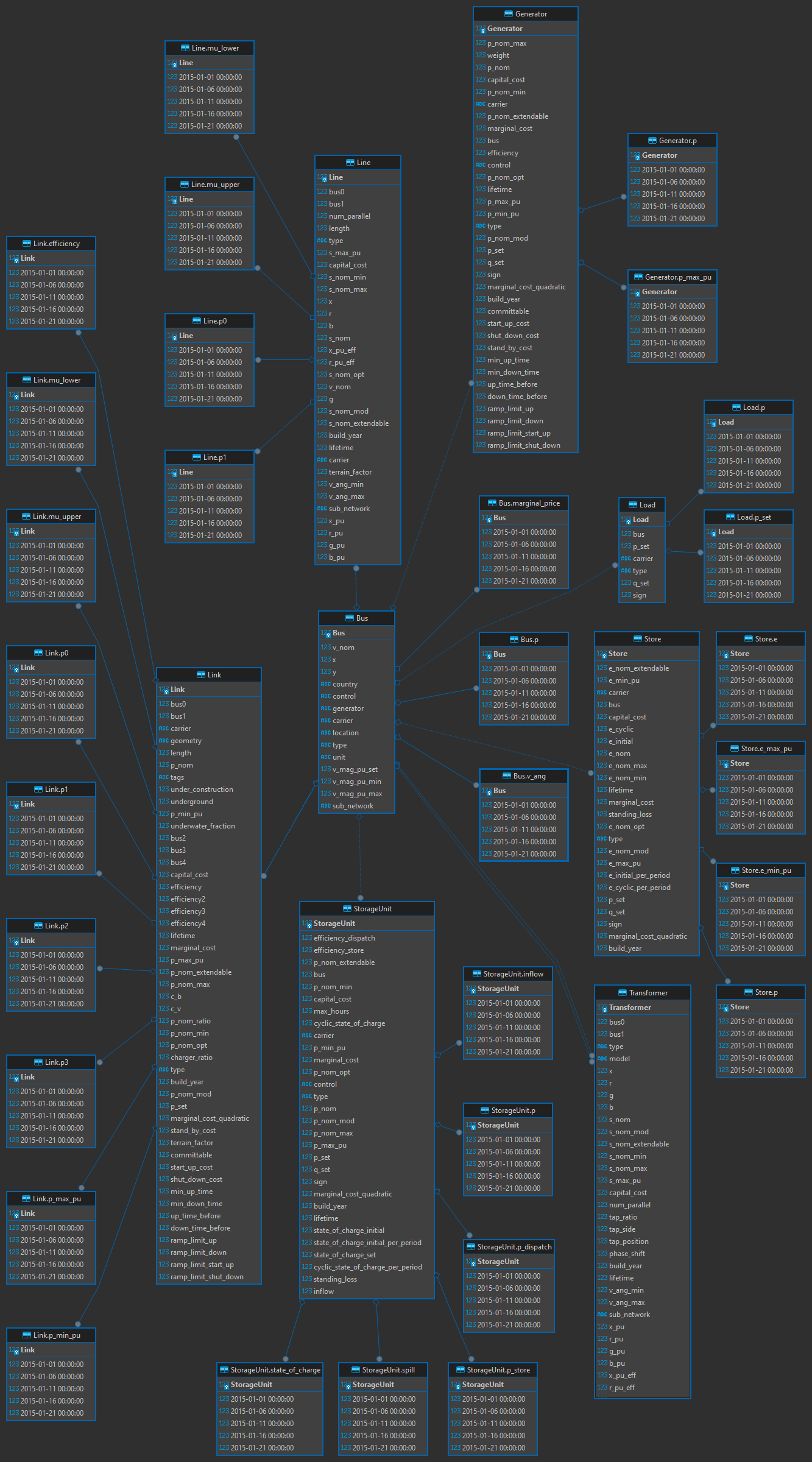
The key attributes used by statistics are:
| Name | Type | Location | Description |
|---|---|---|---|
carrier |
str |
Component static DataFrame (e.g. n.generators) |
Technology identifier, e.g. "onwind", "H2 Electrolysis" |
bus / bus0 / bus1 |
str |
Component static DataFrame | Name(s) of the connected bus. One-port components use bus; branch components use bus0 and bus1. |
carrier |
str |
n.buses |
Energy carrier of the bus, e.g. "AC", "H2", "gas" |
location |
str |
n.buses |
Geographic region of the bus, e.g. "AT", "DE" |
The groupby argument — step by step
n.statistics.supply(groupby=["location", "carrier", "bus_carrier"]) groups component
contributions into a labelled MultiIndex Series. Here is what happens internally:
Step 1 — Iterate components. PyPSA visits each component type (Generator, Link, …). For every component instance it evaluates each grouper function, producing a label.
Step 2 — Evaluate groupers.
| Name | Type | Source | Example value |
|---|---|---|---|
location |
str |
Bus location attribute (custom grouper, avoids EU nodes for branch components) |
"AT" |
carrier |
str |
Component carrier column |
"onwind" |
bus_carrier |
str |
Carrier of the connected bus | "AC" |
unit |
str |
Statistic unit metadata | "MWh" |
Step 3 — Group and aggregate. All component instances that share the same label tuple are summed together.
Step 4 — Build the MultiIndex. The result is a pd.Series indexed by a MultiIndex
with one level per grouper:
location  carrier         bus_carrier
AT        onwind          AC            12 500 000.0    # MWh
          solar           AC             5 200 000.0
          H2 Electrolysis H2             3 100 000.0
DE        onwind          AC            20 300 000.0
dtype: float64
Step 5 — Year prefix (added by collect_myopic_statistics).
When iterating over multiple planning years, a year level is prepended as the outermost index:
year  location  carrier         bus_carrier
2030  AT        onwind          AC            12 500 000.0
                H2 Electrolysis H2             1 400 000.0
2050  AT        onwind          AC            18 700 000.0
                H2 Electrolysis H2             8 200 000.0
Step 6 — Category mapping. The categories table in the view config is a many-to-one
rename dictionary. rename_aggregate replaces each carrier
label with its nice name and sums rows that now share the same tuple:
year  location  carrier     bus_carrier
2030  AT        Wind Power  AC            12 500 000.0   # onwind → Wind Power
2050  AT        Wind Power  AC            18 700 000.0
Worked example: navigating the foreign-key chain
Every grouper value is resolved by following PyPSA's implicit foreign-key relationships between
DataFrames. Taking the bus_carrier and location groupers applied to Links as a concrete
example shows exactly how the four DataFrames connect.
1 — Time-series column labels are component names.
n.links_t.p stores dispatch results with snapshots as rows and Link names as columns.
Those column labels are the primary key of the static n.links table:
n.links_t.p.columns
# Index(['AT onwind-1', 'AT solar-1', 'DE gas CHP-1'], dtype='object', name='Link')
2 — Link names look up rows in n.links.
Each column label is a row in n.links. The bus0 column holds the name of the connected
input bus — a foreign key into the n.buses index:
n.links.loc[n.links_t.p.columns, ["carrier", "bus0"]]
#               carrier          bus0
# AT onwind-1    onwind     AT AC bus
# AT solar-1      solar     AT AC bus
# DE gas CHP-1      gas    DE gas bus
3 — Bus names look up rows in n.buses.
n.buses["carrier"] maps each bus name to an energy carrier; n.buses["location"] maps it
to a geographic region. These are the raw values that the bus_carrier and location groupers
will produce:
n.buses.loc[["AT AC bus", "DE gas bus"], ["carrier", "location"]]
#            carrier location
# AT AC bus       AC       AT
# DE gas bus     gas       DE
4 — .map() chains the two lookups into a grouper Series.
The statistics machinery calls Series.map() to resolve each link name to its final label in a
single vectorised step. For bus_carrier:
n.links["bus0"].map(n.buses["carrier"]).loc[n.links_t.p.columns]
# AT onwind-1     AC
# AT solar-1      AC
# DE gas CHP-1    gas
# Name: carrier, dtype: object
For location, substitute n.buses["location"]:
n.links["bus0"].map(n.buses["location"]).loc[n.links_t.p.columns]
# AT onwind-1     AT
# AT solar-1      AT
# DE gas CHP-1    DE
# Name: location, dtype: object
One such Series is computed per groupby entry. PyPSA combines them into a MultiIndex,
aggregates the snapshot-weighted dispatch values within each group, and produces the labelled
result from Steps 3–5 above.
Custom groupers registered by evals
The evals module registers three additional named groupers at import time:
| Name | Type | Function | Description |
|---|---|---|---|
location |
str |
get_location |
Maps bus → region; for branch components, prefers the non-EU endpoint |
bus0 |
str |
get_location_from_name_at_port (port 0) |
Extracts the location from the bus0 name string |
bus1 |
str |
get_location_from_name_at_port (port 1) |
Extracts the location from the bus1 name string |
These names can be used directly in the groupby list:
n.statistics.transmission(groupby=["bus0", "bus1", "carrier"])
collect_myopic_statistics
collect_myopic_statistics is the primary entry
point used inside view functions. It handles the multi-year iteration and ensures a consistent
index structure across all statistics:
from evals.stats import collect_myopic_statistics

stat = collect_myopic_statistics(
    nc,
    "supply",                    # positional: name of the n.statistics method to call
    bus_carrier=["AC", "H2"],   # keyword argument forwarded to the statistics method
    aggregate_components="sum", # merge Lines and Links into one row (default)
    drop_unit=True,             # store unit in attrs, drop from index (default)
)
The groupby default when calling a standard StatisticsAccessor method is:
["location", "carrier", "bus_carrier", "unit"].
Available pypsa.statistics methods
These methods are available on every n.statistics accessor (provided by StatisticsAccessor):
| Method | Unit | Description |
|---|---|---|
supply |
MWh | Energy delivered to a bus by a component. Covers Generators dispatching, Links converting, Stores discharging. Always positive. |
withdrawal |
MWh | Energy drawn from a bus by a component. Covers Loads, Links consuming at input port, Stores charging. Always positive (sign convention: withdrawal is positive withdrawal). |
transmission |
MWh | Net energy transported by branch components (Line, Link used as transmission). Bidirectional. |
energy_balance |
MWh | Multi-port balance for each component port; tracks input and output at every port of a Link separately (useful for conversion-chain accounting). |
optimal_capacity |
MW | Post-optimisation capacity (p_nom_opt). The main capacity result. |
installed_capacity |
MW | Pre-existing capacity (p_nom with p_nom_extendable=False). |
expanded_capacity |
MW | New capacity added by the optimiser (optimal - installed). |
capex |
currency | Annualised capital expenditure for all capacities (installed + expanded). |
installed_capex |
currency | Annualised CAPEX for pre-existing capacities only. |
expanded_capex |
currency | Annualised CAPEX for newly built capacities only. |
fom |
currency | Fixed operations and maintenance cost (proportional to optimal capacity). |
opex |
currency | Variable (fuel + marginal cost) operational expenditure. |
overnight_cost |
currency | Total overnight investment cost (not annualised). |
system_cost |
currency | Total system cost = annualised CAPEX + OPEX. |
curtailment |
MWh | Energy that could have been generated but was curtailed by the optimiser. Relevant for VRE generators. |
capacity_factor |
— | Ratio of actual generation to the theoretical maximum (p_nom × hours). Ranges 0–1. |
revenue |
currency | Revenue earned at shadow prices of connected buses. |
market_value |
currency/MWh | Revenue per unit of energy; indicates how well a technology captures peak prices. |
prices |
currency/MWh | Average marginal price per bus (dual variable of the nodal balance constraint), weighted by supply. |
In addition, ESMStatistics (the subclass registered by evals)
provides:
| Method | Unit | Description |
|---|---|---|
[trade_energy][evals.statistic.ESMStatistics.trade_energy] |
MWh | Energy exchanged between locations. Scope can be "foreign" (cross-country), "domestic" (same country, different regions), or "local" (same location, different carrier). Positive = import, negative = export. |
[trade_capacity][evals.statistic.ESMStatistics.trade_capacity] |
MW | Transmission capacity between locations for the given scope and bus carrier. |
[loss][evals.statistic.ESMStatistics.loss] |
MWh | Energy lost in transmission and conversion branches (Link, Line, Transformer), attributed to the location sending power at each snapshot. |
Code examples
Querying annual supply by technology
from evals.fileio import read_networks
from evals.stats import collect_myopic_statistics

nc = read_networks("results/my_scenario")

supply = collect_myopic_statistics(
    nc,
    "supply",
    bus_carrier="AC",              # electricity buses only
)

print(supply)
# year  location  carrier  bus_carrier
# 2030  AT        onwind   AC           12 500 000.0
#                 solar    AC            5 200 000.0
# 2050  AT        onwind   AC           18 700 000.0
# dtype: float64
Filtering by multiple bus carriers
balance = collect_myopic_statistics(
    nc,
    "supply",
    bus_carrier=["H2", "gas"],   # hydrogen and methane buses
    groupby=["location", "carrier", "bus_carrier"],
)
Querying optimal capacity
capacities = collect_myopic_statistics(
    nc,
    "optimal_capacity",
    bus_carrier="H2",
)
# Unit stored in attrs: capacities.attrs["unit"] == "MW"
Peak flows with aggregate_time="max"
For time-dependent statistics (transmission, trade_energy, energy_balance) the result
is a DataFrame with snapshots as columns when aggregate_time=False. Passing
aggregate_time="max" collapses the time axis by taking the maximum across all snapshots —
giving you peak instantaneous flows rather than annual sums.
Note
"max" skips snapshot weighting (no multiplication by snapshot_weightings).
The result is the raw peak value in the native unit (MW for power, MWh for single-snapshot
energy amounts when the resolution is 1 h).
# Peak hydrogen pipeline flow — useful for infrastructure sizing
peak_h2_flow = collect_myopic_statistics(
    nc,
    "transmission",
    bus_carrier="H2",
    groupby=["bus0", "bus1", "carrier"],
    aggregate_time="max",        # peak snapshot value instead of annual sum
)

print(peak_h2_flow)
# year  bus0  bus1  carrier
# 2030  AT    DE    H2 pipeline    450.0   # MW
# 2050  AT    DE    H2 pipeline    820.0
# Peak electricity import into Austria
peak_import = collect_myopic_statistics(
    nc,
    "trade_energy",
    scope="foreign",
    direction="import",
    bus_carrier="AC",
    aggregate_time="max",        # peak hour instead of yearly total
)
# Yearly sum (default) for comparison
annual_wind = collect_myopic_statistics(nc, "supply", bus_carrier="AC")
# aggregate_time defaults to "sum" inside collect_myopic_statistics
Keeping the time axis
Pass aggregate_time=False to get a DataFrame with snapshots as columns. This is what the
view_timeseries_* views use internally:
ts = collect_myopic_statistics(
    nc,
    "supply",
    bus_carrier="AC",
    aggregate_time=False,        # returns DataFrame: index=MultiIndex, columns=snapshots
)
# ts.columns.name == "snapshots"
Views reference
The table below lists all built-in views, their default chart component, and a short description.
Switching components
The chart component is configured via the chart key in config.override.toml.
Swapping between ESMBarChart and ESMGroupedBarChart is always safe because both
accept the same data layout — use ESMGroupedBarChart when you want the data split
into facets by bus_carrier, and ESMBarChart when a single stacked panel is enough.
ESMTimeSeriesChart and SankeyChart have a different data contract and cannot be
swapped with the bar-chart classes.
Balances
| View function | Default component | Description |
|---|---|---|
view_balance_electricity |
ESMBarChart |
Annual electricity supply and demand, split by technology and trade flows |
view_balance_carbon |
ESMBarChart |
Net CO₂ balance: emissions (positive) vs. capture/sequestration (negative) |
view_balance_heat |
ESMGroupedBarChart |
Heat supply and demand per heat system (urban central, urban decentral, rural) |
view_balance_hydrogen |
ESMBarChart |
Hydrogen supply and demand, including trade and storage |
view_balance_methane |
ESMBarChart |
Methane supply and demand across gas, biogas and industry buses |
view_balance_biomass |
ESMBarChart |
Solid biomass supply and consumption across all conversion routes |
view_balance_fuels |
ESMGroupedBarChart |
Primary fuel balances (oil, coal, solid biomass, waste, methanol, ammonia, uranium) grouped by carrier family |
Time series
| View function | Default component | Description |
|---|---|---|
view_timeseries_electricity |
ESMTimeSeriesChart |
Hourly electricity production and demand for a selected year |
view_timeseries_hydrogen |
ESMTimeSeriesChart |
Hourly hydrogen production and demand for a selected year |
view_timeseries_methane |
ESMTimeSeriesChart |
Hourly methane production and demand for a selected year |
view_timeseries_carbon |
ESMTimeSeriesChart |
Hourly CO₂ emissions and capturing for a selected year |
view_timeseries_residual_load |
ESMTimeSeriesChart |
Hourly residual load (AC demand + transmission losses − fluctuating renewable supply) for a selected year |
view_residual_load_duration_curve |
ESMTimeSeriesChart |
Hourly residual load sorted into a duration curve for a selected year |
Capacities
| View function | Default component | Description |
|---|---|---|
view_capacity_electricity_production |
ESMBarChart |
Optimal generation capacity on AC/low-voltage buses |
view_capacity_electricity_demand |
ESMBarChart |
Optimal electricity-consuming capacity (electrolysers, heat pumps, compressors, …) |
view_capacity_electricity_storage |
ESMBarChart |
Electricity storage volumes (PHS, batteries, EV fleet) in TWh |
view_capacity_gas_storage |
ESMBarChart |
Gas storage volumes (methane and hydrogen stores) in TWh |
view_capacity_hydrogen_production |
ESMBarChart |
Optimal hydrogen production capacity by technology |
view_capacity_heat_production |
ESMGroupedBarChart |
Heat production capacity per heat system type |
view_capacity_gas_production |
ESMBarChart |
Optimal methane production capacity (SNG, biogas, imports, …) |
Demand
| View function | Default component | Description |
|---|---|---|
view_demand_heat_total |
ESMBarChart |
Total primary energy consumed for heat production, grouped by input carrier |
view_demand_heat_system |
ESMGroupedBarChart |
Primary energy per heat system type (urban central, urban decentral, rural), grouped by input carrier |
view_demand_fed_total |
ESMBarChart |
Final energy demand aggregated across all sectors |
view_demand_fed_sectoral |
ESMGroupedBarChart |
Final energy demand split by sector (Transport, Industry, Agriculture, HH & Services) |
Energy flow
| View function | Default component | Description |
|---|---|---|
view_sankey |
SankeyChart |
Full system energy-flow Sankey from primary energy through conversion to final demand, with pie charts for primary energy mix and FED breakdown |